
What Information Should a Motorhome Forecourt Display Show?.
- What Information Should a Motorhome Forecourt Display?
- Which Specifications Should a Motorhome Forecourt Display Include?
- How Can Motorhome Floorplans Help Customers Compare Vehicles?
- How Can Forecourt Displays Promote Finance Options, Accessories, and Upgrades?
- How Can Digital Vehicle Pricing Displays Improve Forecourt Management?
- Make More of Your Caravan, Campervan, and Motorhome Forecourt Displays
- FAQs
What Should a Campervan, Caravan, and Motorhome Forecourt Display Show?
If you run a motorhome or caravan dealership, you’ll know there’s plenty to keep on top of. From updating prices to ensuring every vehicle has the right information on display, the little jobs can add up.
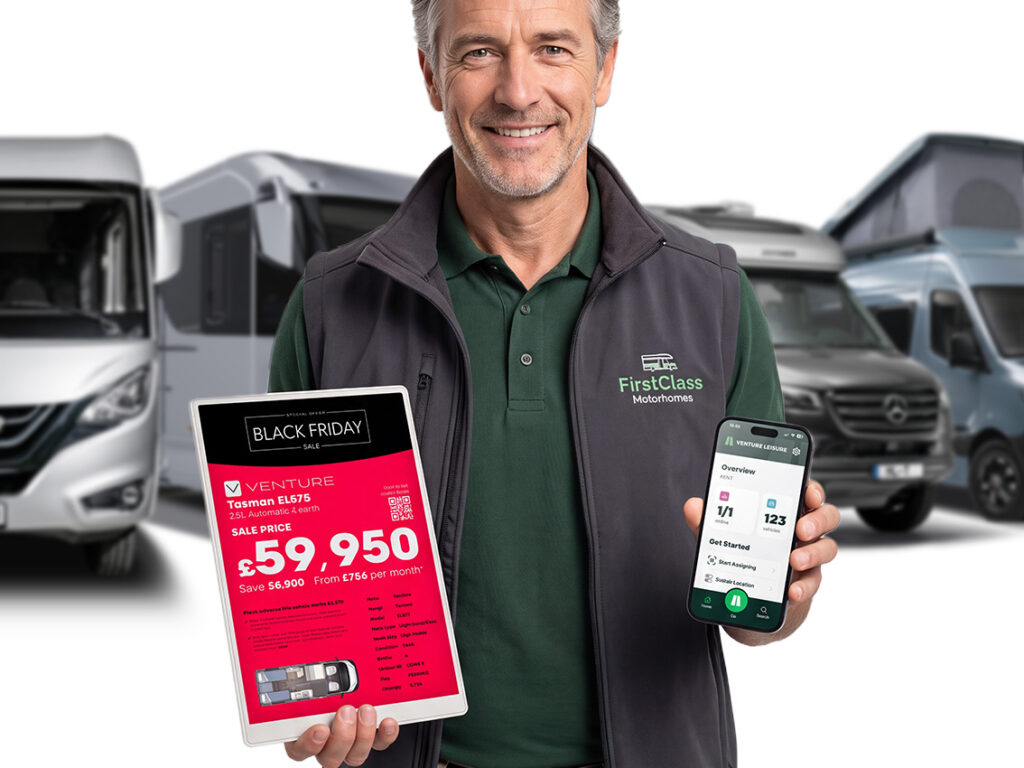
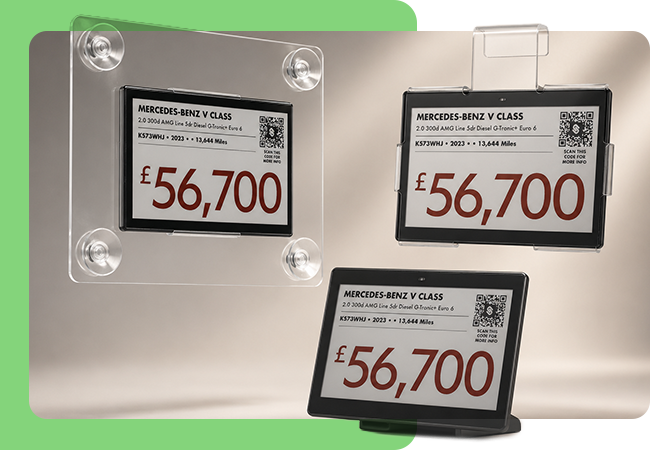
Motorhome forecourt displays should do much more than show a price. AutoTalker’s vehicle pricing displays can display vehicle specifications, floorplans, finance options, accessories, and special offers, giving customers more information while they browse. Our digital displays can also link to online brochures, videos, and vehicle listings through QR codes.
For dealers, this means there’s more room to show customers what makes each vehicle worth a closer look, without filling the windscreen with printed sheets. With AutoTalker, vehicle information can be managed digitally, helping dealerships keep displays up to date while spending less time on manual updates.
So, what should a motorhome forecourt display include, and how can digital displays help your dealership make more of its stock?
What Information Should a Motorhome, Campervan, or Caravan Dealership Forecourt Display?
A good motorhome forecourt display should answer the questions customers are most likely to have when they first see a vehicle; they want to know what it is, how much it costs, and whether it suits their needs.
At a minimum, consider including:
- Manufacturer and model
- Vehicle price and any current offers
- Whether the vehicle is new or used
- Sleeping capacity and main specifications
- Finance options (where available)
- Dealership branding
- A QR code linking to more information
The information should be easy to read at a glance. Customers may be walking around the forecourt, looking through a windscreen, or comparing several vehicles at once. A clear and colourful layout helps them find what they need without having to work through a wall of text.
Make the price clear
Price is often one of the first things a buyer looks for. Make the selling price easy to spot, and explain any discounts or special offers clearly. Keeping this information up to date matters, too. Printed price sheets need to be replaced whenever a price changes, which can quickly become a time-consuming job across even a small forecourt.
Digital vehicle pricing displays offer another option. With AutoTalker, dealers can manage vehicle information digitally, making it easier to update prices and offers without printing new sheets for individual vehicles.
Give customers a reason to look closer
A motorhome forecourt display is also an opportunity to show what makes a vehicle worth considering. A special offer, an unusual layout, or an included accessory might catch a customer’s attention.
Consistent branding helps every vehicle look like part of the same dealership, while clear images and well-organised information make displays easier to understand. The aim is to give customers enough information to decide which vehicles they’d like to explore further.
Which Specifications Should a Caravan, Campervan, and Motorhome Forecourt Display Include?
The right specifications help customers work out whether a vehicle fits their lifestyle, budget, and travel plans. The information you show will depend on the type of vehicle and the people most likely to buy it.
For motorhomes, campervans, and caravans, useful details include:
- Number of berths and travelling seats
- Engine size, fuel type, and transmission
- Overall length, width, and height
- Weight and available payload
- Heating, cooking, and bathroom facilities
- Warranty details and included equipment
For caravans, consider showing the number of berths, overall dimensions, weight, payload, layout, heating, kitchen facilities, and washroom features. Not every detail needs to appear on every display. Choose the specifications that help customers compare vehicles, then use the available space to provide more information.
For example, someone looking for a family motorhome might want to know how many people it sleeps and how many travelling seats it has. A couple searching for a compact campervan might care more about its size, engine, and ease of driving.
Make technical details easier to understand
Weight information is particularly important for leisure vehicles. Motorhome buyers need to understand the vehicle’s maximum authorised mass and payload, while caravan buyers need to consider the caravan’s weight and its suitability for their towing vehicle.
Use accurate figures for each vehicle, and make sure the information is presented clearly. Sales staff can still explain what these figures mean for passengers, luggage, and equipment. Digital displays just give dealerships room to present a range of specifications without relying on one small, printed sheet. With AutoTalker, vehicle information can be displayed in a format that suits the vehicle type, helping customers find the details that matter to them.
How Can Motorhome and Caravan Floorplans Help Customers Compare Leisure Vehicles?
A floorplan can tell a customer a lot about a leisure vehicle before they step inside. Two motorhomes might sleep the same number of people but have completely different layouts. One might have fixed beds and a separate lounge, while another uses seating that converts into sleeping space. Caravans and campervans can also vary just as much in their kitchen, washroom, and seating arrangements.
Showing a floorplan helps customers picture how they could use the space. For families, the position of the beds and seating might be a deciding factor. Couples planning longer trips may prefer a larger lounge, more storage, or a spacious washroom.
Give floorplans enough room
A floorplan needs to be large enough to read. If the image is too small or crowded with text, customers may struggle to understand the layout. Where possible, display the floorplan alongside a few useful specifications, such as the number of berths and the vehicle’s dimensions. This gives buyers a quick overview without overwhelming them with information.
AutoTalker digital displays can show floorplans alongside vehicle details, helping dealers present more than just the price and model name. We also provide a range of sizes amongst our vehicle pricing displays, helping dealers to tailor the digital vehicle pricing experience to the vehicle itself.
Help customers explore further
A floorplan shows the layout, but photographs and videos can help customers get a better feel for the interior. QR codes provide a great way to connect the motorhome forecourt display to a vehicle’s online listing, brochure, or video tour. Customers can scan the code on their phone and explore the vehicle in more detail, even when a member of staff isn’t available. This also gives dealerships a way to provide more information without trying to fit everything onto the display itself.
How Can Dealership Forecourt Displays Promote Motorhome Finance Options, Accessories, and Upgrades?
A motorhome forecourt display can help dealers show customers what else is available, from finance options to accessories that make a vehicle better suited to their plans. The trick is to show relevant information without making the display difficult to read.
Show finance options clearly
Some customers focus on the full purchase price, while others want to understand the finance options available. Where finance is offered, displays can show suitable finance information or representative examples.
Customers should be able to find the full terms rather than relying on a monthly payment figure alone. Digital displays can help dealers keep finance messages in line with current offers. This is particularly useful when a promotion either changes or applies to several vehicles across the forecourt.
Show customers what else they could add
Accessories and upgrades can make a vehicle more useful, but customers might not know what’s available until they speak to a salesperson.
Displays could highlight options such as:
- Awnings and bike racks
- Solar panels and battery upgrades
- Satellite systems and connectivity equipment
- Security products and touring accessories
- Service plans and protection packages
Think about which extras make sense for each vehicle. A solar panel upgrade might appeal to someone planning to spend time away from campsites with electrical hookups, while an awning could be useful for a family wanting more sheltered outdoor space. Make it clear whether an item is included in the vehicle’s price or available at an extra cost. This helps avoid confusion and gives customers a better idea of what they can buy.
Keep offers up to date
Seasonal promotions and manufacturer offers can help draw attention to selected vehicles. However, an expired offer left on display can cause frustration and undermine trust. AutoTalker allows dealers to manage display content digitally, reducing the need to replace printed material whenever information changes. Keeping the source information accurate remains important, but digital updates can make the process easier.
How Can Digital Vehicle Pricing Displays Improve Motorhome and Caravan Forecourt Management?
Keeping a forecourt up to date takes time. Vehicles are added to stock, prices change, and promotions come and go. With printed sheets, every update can mean finding the right vehicle, printing new information, and replacing the old display.
Across a dealership, those small jobs can quickly add up. Digital vehicle pricing displays offer a different way to manage this work, while giving dealers more space to show customers what each vehicle offers.
Manage vehicle information digitally
AutoTalker can connect with DMS and vehicle stock data to help populate displays with information such as prices and specifications. Depending on the integration, changes to the connected data can be reflected on the relevant displays without staff having to recreate each sheet manually.
AutoTalker supports integrations with leading dealer management systems, as well as API, CSV, and bespoke integrations. This helps dealerships connect their existing data to their forecourt displays.
The result is a more practical way to manage vehicle information, with less time spent printing and replacing sheets. Dealers should check their specific systems and integration requirements to understand how the setup would work for their business.
Manage several vehicles or branches
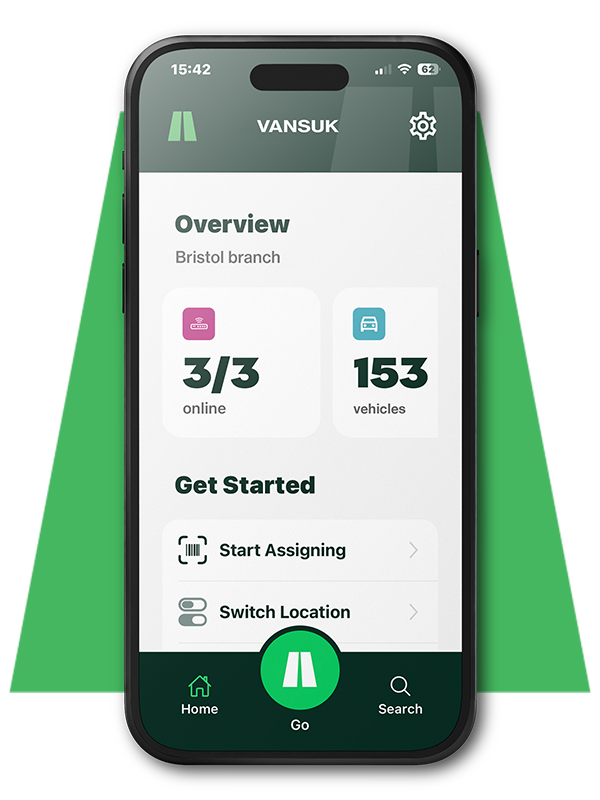
AutoTalker lets dealerships manage digital displays through an app, making it easier to oversee information across their forecourt and connected locations. Dealers can also use different display layouts for different types of vehicles. A motorhome might need more space for engine details and travelling seats, while a caravan display could give more attention to its layout, weight, and sleeping capacity.
Make better use of display space
One of the biggest advantages of digital forecourt displays is the ability to show more than a price and a short list of specifications. AutoTalker displays can bring together vehicle details, floorplans, finance information, promotional messages, and QR codes. This gives customers more ways to learn about a vehicle while browsing, without requiring dealers to attach several separate sheets to the windscreen.
Digital e-paper displays also use battery power efficiently. AutoTalker displays offer battery life of up to ten years (with no requirement to be plugged in), depending on operating conditions and usage, helping to reduce the need for frequent battery changes.
Connect the forecourt to your website
A QR code can take customers from a physical display to a vehicle’s online listing, brochure, video, or enquiry form. This is perfect for people who want to compare vehicles later or look through more photographs before speaking to a salesperson. It also means dealers can make more information available without overcrowding the display.
Make More of Your Caravan, Campervan, and Motorhome Forecourt Displays
Digital displays give dealerships more ways to present information in one place. Instead of relying on printed price sheets, dealers can show floorplans, promotional content, and QR codes that connect customers to even more detail online.
AutoTalker brings these features together in a digital display solution designed for leisure vehicle dealerships. By making better use of the space available on each display, dealers can give customers more useful information while making forecourt management easier. Test drive AutoTalker’s software today and receive a personalised quote for your dealership.
FAQs
A digital display is an electronic screen or label that shows information without the need for printed signs. AutoTalker’s digital vehicle pricing displays can show vehicle prices, specifications, floorplans, finance options, and promotions on forecourts.
Digital signage is a broad term for electronic displays used to show information, images, and promotions. LED signage uses light-emitting diodes to display content, while AutoTalker’s e-paper digital displays use a different display technology designed to show clear, static information with low power consumption.
Digital vehicle signs are available from specialist providers such as AutoTalker, which supplies electronic shelf labels for all vehicle dealerships. These displays can show pricing, specifications, floorplans, and other vehicle information directly on the forecourt.
Make your vehicles stand out with clear pricing, useful specifications, floorplans, and information about finance options or available extras. AutoTalker’s digital vehicle displays help dealerships present more information on the forecourt, giving customers more reasons to explore vehicles and take the next step.

Ellie Dharamraj is a writer who graduated from the University of East Anglia with a 2:1 degree in Creative Writing & English Literature.